



Loading Turgalicia points of interest in OziExplorer
1. Identification of software OZIExplorer
Installation of Oziexplorer software allows you to incorporate waypoint files (.wpt) files onto the GPS.
There are three kinds of OziExplorer software:
- OziExplorer lets you work with digital maps, on which you can plan routes and load them onto your GPS.
- OziExplorer3D is software that lets you view 3D maps.
- OziExplorerCE is mapping software for PocketPC and PDA.
Here, we will describe the use of OziExplorer software; because of its incorporation into the GPS.
OziExplorer is available for installation on computers with Windows operating systems..
For operating systems such as Unix, OziExplorer can be included from Wine (Wine Is not a Emuladot).
There are GPS devices compatible with OziExplorer; among them we may mention the following brands:
Eagle, Garmin, Lowrance, Magellan, MRL, Bruton/Silva, Blutooth GPS, Use Mouse GPS, Serial Mouse GPS, Solo NMEA.
The OziExplorer software can be downloaded from the website: http://www.oziexplorer.com/
Bear in mind that the OziExplorer program is not free.
Installation is easy: follow all the steps of the dialogue boxes shown and accept the whole procedure.
2. Using OziExplorer
On the website www.turismo.gal there are points of interest files available to download in .wpt format. This format is applied to the OxiExplorer program, following the process described below.
2.1. Installing onto the GPS device
Open the program; the GPS should be connected to the computer with a USB drive.
Then to configure the GPS, go to the GPS, Configure GPS option.
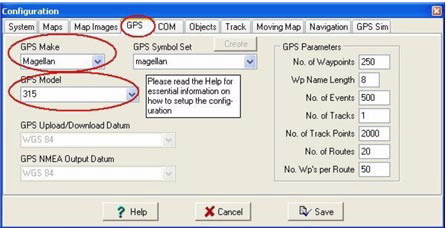
Once the GPS is selected in the GPS tab, Parameters, it will automatically select the characteristics of the device.
You will also have to configure the communication speed between the computer and the GPS. This is done in the COM tab.

In the COM tab, the default parameters are appropriate for all GPS devices.
2.2. Entering maps in OZIExplorer
When you execute the OziExplorer program, it appears to be empty because it is necessary to enter a calibrated map.
The map loading can be done by entering geo-referenced, calibrated or uncalibrated maps, in the latter two it is necessary to apply a geo-referencing procedure
2.2.1. Loading a calibrated map in OZIExplorer
This operation can be performed from the main menu or the secondary menu:
From the main menu, File, Load from file, Load Map File.

From the secondary menu, Load, Load Map File

2.2.2. Incorporating and calibrating a map
To calibrate a map, you must activate the option: File Load and calibrate map image.
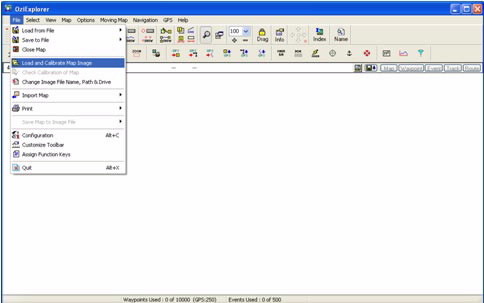
Doing so opens a map that may be in the following formats: BSB, USGS DRG, ECW, SID, TIF, PNG, entre outros.
Once the map is loaded, proceed with its calibration, File Check Calibration of Map. A new window will appear on the right side of the application where you can change the Datum, Mag Var and the Map Projection corresponding to the loaded map.

The next step is to assign known control points with their corresponding co-ordinates on the map.
The Point 1, point 2, ... tabs are for this; you must enter the corresponding co-ordinates for each point. The more control points are entered, the better the map calibration will be.
2.3. Loading points of interest
Once the calibrated map is loaded in the program, you can load the POI; this procedure may also be done in two ways:
From the main menu: File, Load from File, Load Waypoint from File

From the secondary menu: Load, Load Waypoint from file.

A new window will appear where you can locate the points of interest. Once located and selected, they can be viewed in OziExplorer
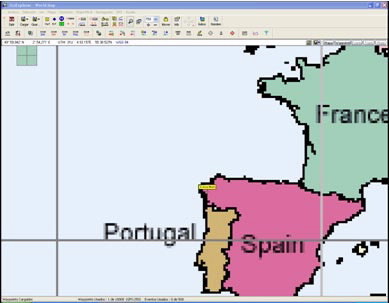
Once the POI are incorporated into the Oziexplorer program, they can be entered in the GPS in two ways:
- From the main menu where the GPS brand appears, Send Waypoint to GPS
- From the secondary menu, with the Send select waypoints to GPS option.
2.4. Viewing the points of interest
After the points of interest are loaded, disconnect the GPS from the computer. Once the GPS has been switched on, you will be able to see the new POI.
3. Mechanisms for conversion to other formats with GPSBabel
3.1 Loading points of interest
The GPSBabel program enables the conversion of more than 140 file formats so you can work with them in different programs for editing and processing geographical information and different GPS receiver models.